WiFi Faucet Desktop: Making Invisible Network Activity Understandable
WiFi Faucet Desktop turns Windows connection evidence into a live, human-readable view — and is beginning to detect what changes in a PC's network behavior.
Your computer is communicating all the time.
Browsers, cloud services, games, system components and background applications continuously establish network connections. Windows can expose much of this technical information, but for an ordinary user it often appears as little more than process names, IP addresses, ports and connection states.
WiFi Faucet Desktop is a Kanverse experiment designed to make that activity visible and understandable.
Rather than intercepting traffic or examining the contents of communications, WiFi Faucet works with connection information reported by Windows and presents it as a live, human-readable view of what the computer is doing.
Open the Faucet
The central idea is deliberately simple: turn invisible network activity into something you can see.
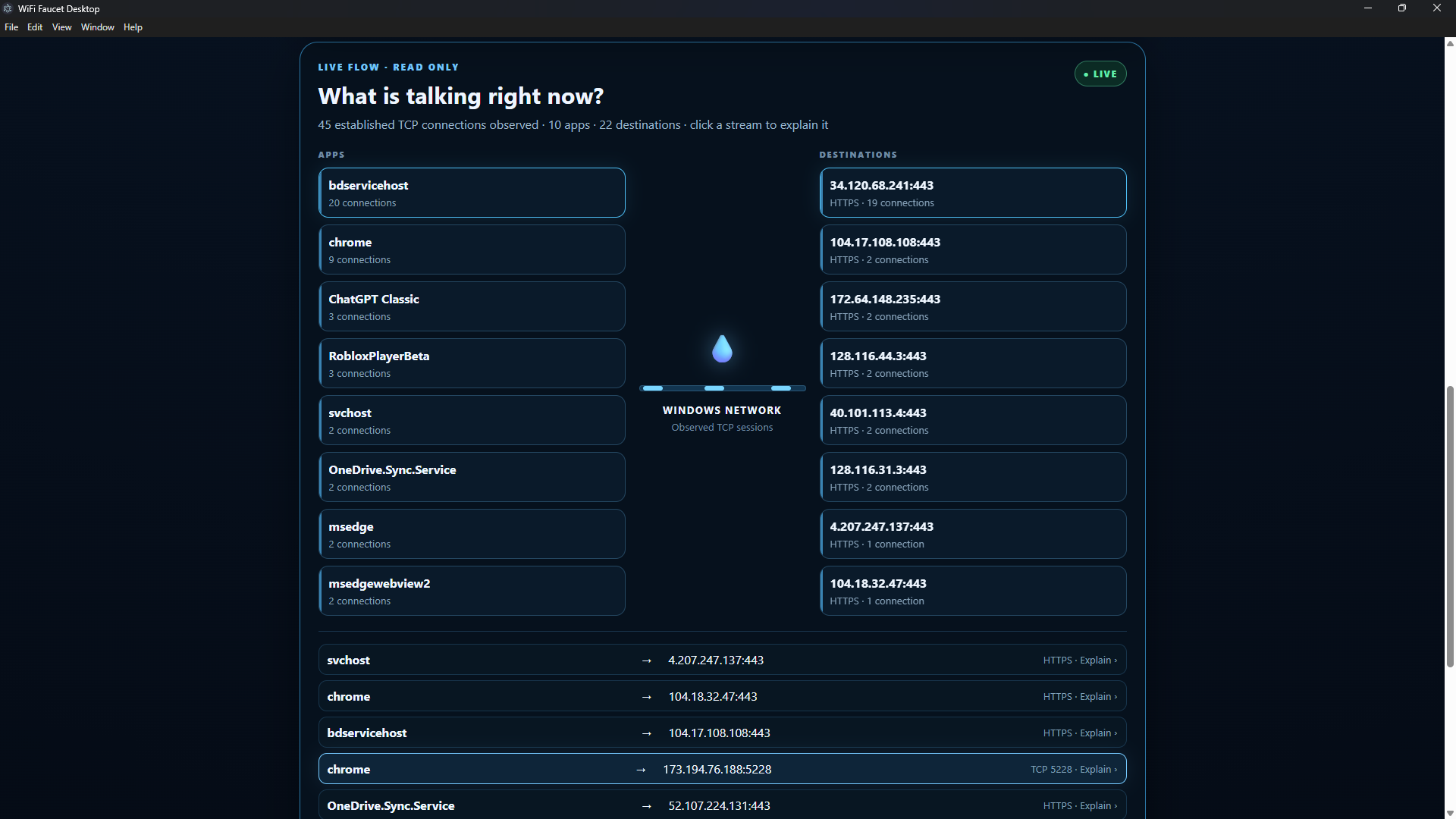
The current desktop prototype can observe established TCP connections and organize them around the applications creating them and the remote destinations they are communicating with.
Instead of confronting the user with a wall of networking data, Faucet asks a much simpler question:
What is talking right now?
From there, individual connections can be explored and explained.
From monitoring to understanding
Seeing connections is only the first step.
WiFi Faucet can provide an evidence-based explanation of an observed connection: which application Windows associates with it, the destination and port, the connection state, and what can reasonably be inferred from that information.
There is an important rule behind the project: Faucet should distinguish what it observes from what it merely infers.
An unfamiliar IP address is not automatically dangerous. A familiar connection is not automatically trustworthy. And an HTTPS connection tells us something about the type of communication without proving what the remote service actually is.
That distinction is intentional.
The computer begins learning its own normal
The latest prototype introduces another idea: local behavioral intelligence.
The user can establish the computer's current observed network pattern as a baseline. WiFi Faucet then compares subsequent activity against that local baseline.
In the current working prototype, Faucet has successfully detected new connection patterns after a baseline was established, including identifying when an application that was not present in the baseline began communicating.
Instead of simply saying “There is another connection,” Faucet can begin answering a much more useful question:
What changed?
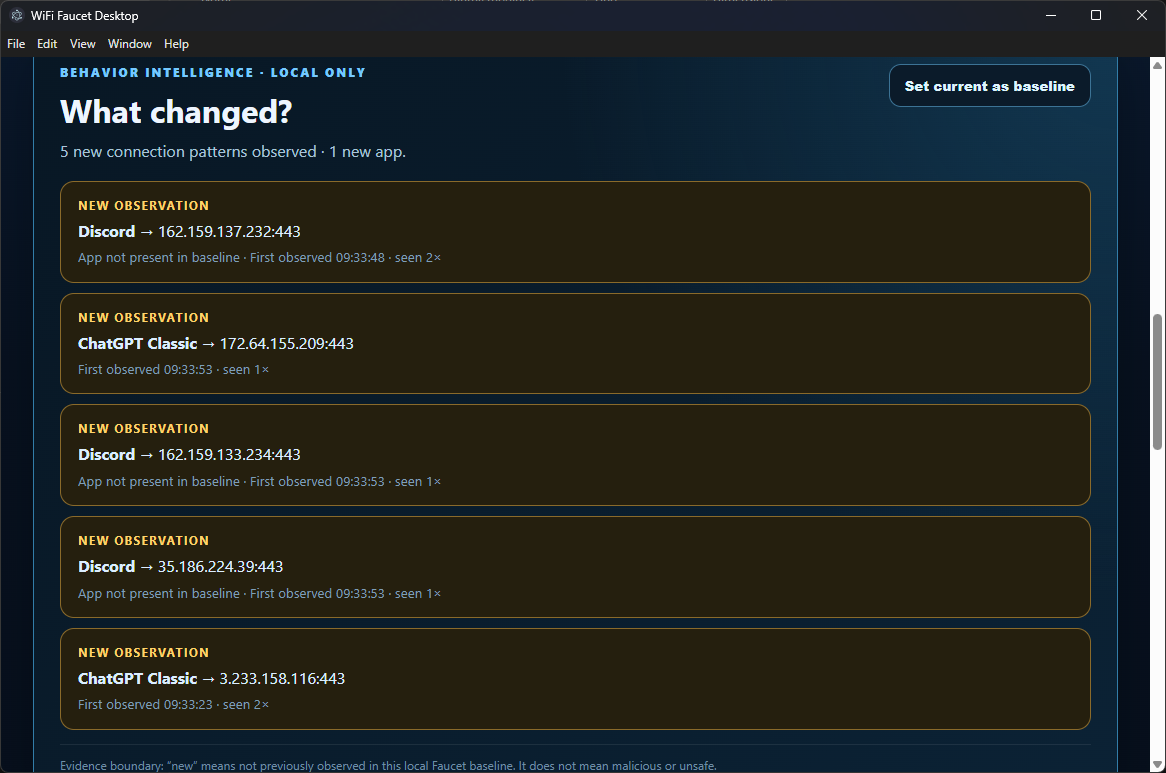
The prototype records newly observed application-to-destination patterns, when they were first observed and how often they have subsequently appeared.
Again, new does not mean malicious. It means precisely what it says: Faucet had not previously observed that pattern in the selected local baseline.
Local first. Read only.
The current WiFi Faucet Desktop prototype is deliberately conservative.
It is being developed as a defensive visibility tool. Its purpose is to help people understand their own computers, not interfere with network traffic.
The behavioral history used by the current prototype is local to the computer, and the interface explicitly communicates the boundaries of the evidence it presents.
What comes next
Development of this branch is now being temporarily frozen at a working milestone while Kanverse continues work on related desktop and connector technology.
When WiFi Faucet development resumes, one of the planned directions is Change Radar: turning potentially dozens of individual new connections into meaningful behavioral events such as a newly observed application, new destination, unusual port or sudden change in connection activity.
Beyond that lies a larger idea.
Over time, a computer develops recognizable patterns of network behavior. Applications communicate with recurring groups of services, at recurring times and in recurring ways.
WiFi Faucet may eventually allow people to see that pattern almost as a Network DNA of their machine — and immediately explore the small portion that has changed.
That is where the project becomes more than another network monitor.
It becomes a way of asking your computer:
What are you doing, and what is different today?
WiFi Faucet Desktop is currently a Kanverse development preview. It is not yet being presented as a finished security product or as a replacement for antivirus, firewall or professional network-analysis software.
Kanverse — building tools that make complex systems understandable.